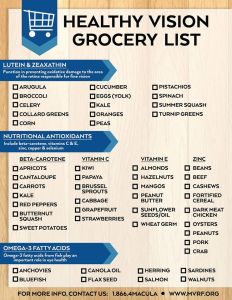
Highlight: What foods should I be eating for good eye health?

Nutrition for Good Eye Health – the Basics

Disclaimer

Eye Healthy Nutrients

Click here for a good place to start to learn about aspects of nutrition that have been recommended for good eye health.


<–Click on the photo for a larger image.

Click here for more details from AOA (American Optometic Association) about this infographic.


Click here for a printable grocery list.


Diet Plans for Good Eye Health

            • not listed in any particular order; we aren’t making any recommendations & we make no money on the sale of any of the products below.
            • Macular Degeneration Diet and Prevention Plan by Dr. Stuart Richer, OD, PhD, Ocular-Nutrition Laboratory in DVA Medical Center Eye Clinic, North Chicago, IL
            • Eyefoods has a diet plan that you can learn about in their book, on their website, Facebook page or blog
            • Eat For Your Sight Cookbook from the AMDF (American Macular Degeneration Foundation), the cookbook is available here or through amazon.com
            • Mediterranean Diet for eye health
            • Anti-inflammatory Diet
            • Cure AMD, proposed eating plan (based on ‘ancestral diet’) to prevent AMD and reverse it in its early stages.  I’ve corresponded with the author & expressed my concern about his use of the word ‘cure’.  He said he believes so strongly on his research that he could not use any other title.

      • Disclaimer:  We have a standard disclaimer that no one reads ::smile:: so I just want to remind you that we say in it:
        • Any information, books, products or any other materials at My Macular Degeneration  Journal/ey are not intended to treat, diagnose, cure or prevent any disease, disorder or health condition, and is provided for educational purposes only.
        • Always consult your doctor with eye health questions about your specific medical conditions and before starting any diet, exercise, or supplement program.

Go to the Top

Highlight: Where can I find books in formats for people with visual disabilities?

Sources of Books

  • Formats: Braille, large print, e-book and audiobooks; some services for free if you qualify
  • US Library Service provides ‘Talking Books’ in Braille & audio; you need their e-reader
  • US BARD (Braille and Audio Reading Download) also from the US National Library Service; you can read them on an Apple or Android device or app
  • US BARD & BARD Mobile: YouTube video talking about the service
  • US & Canada Sources of large print & Braille reading materials
  • UK RNIB Overdrive: ‘Talking Books’ by digital download
Worldwide
  • Worldwide Kindle e-book readers: which is the right one for people with low vision?
  • Bookshare:
    • US BookShare: 300,000+ titles including all current and recent NY Times bestsellers; free for students, $50/year with $25 setup fee.  Subscriptions are available for organizations.
    • United Kingdom: similar subscriptions to that of the US site
    • India: for subscription prices, check the website
    • Bookshare International/Without Borders for 70 countries; check the website for the countries, available books & cost
  • Daisy (Digital Accessible Information System) offers audio books, magazines & newspapers:
    • DAISY books can be heard on standalone DAISY players, computers using DAISY playback software, mobile phones, and MP3 players (with limited navigation). DAISY books can be distributed on a CD/DVD, memory card or through the Internet.
    • YouTube video shows what their digital books look like
    • Source of Daisy books for Daisy reader, computer, tablet or smartphone
    • At the bottom of this page, there’s a long list of software that plays Daisy books
  • Worldwide Overdrive: borrow e-books & audiobooks from local librarie
  • Many countries of the world BookBub: Free and inexpensive e-books covering many genres
Sue’s pages about books
Did we miss any? Please let us know if we did.


Highlight: Is there any way I can learn to better use what vision I have?

It’s Linda and today I have AMD.  Let me explain.  I want to share what I know about Eccentric Viewing which is a way to maximize the peripheral vision that you do have in order to read text and see faces and objects when robbed of one’s central vision.  I do not have AMD, that’s Sue. Because my Dad had it, I know that I have a 50/50 chance of developing it plus I have a few other risk factors. Having gone through the experience of Sue developing AMD & and doing research for the website, it is a much more real possibility that I will develop also AMD.

I’m simulating AMD by putting dots on my eyeglasses where my central vision would be

I decided to do a mostly unscientific experiment. I cut out dots from the top of a sticky note and pasted them on my eyeglasses.  I had to look in the mirror to find the right positions because my blind spots would not in the exact center of my glasses.  My spots are not perfectly round nor are they exactly in the middle because that would be how it is naturally.  The actual blind spot on the macula of the eye would be tiny but I had to represent it as it would appear in my visual field.  At first I thought that this would not be an accurate simulation because my glasses correct my vision but I know Sue and others wear corrective lenses to maximize the remaining vision (more about that below).  I’m sure this is not exactly accurate but I think it’s the best I can do.

Two observations right away: 1) I’ve developed a queasiness that I can’t explain but I’m guessing it is partly a physical reaction to the vision changes but also an emotional reaction to experiencing AMD.  As for the physical issues, I have serious astigmatism so my eye doctor adjusted my glasses and I’m guessing that some of the most extreme corrections are in the peripheral vision areas and that is not where I’m used to looking; 2) I found it hard to take a selfie because to do this, I had to look straight ahead.  I did much better navigating in the house probably because it is familiar.

On to Eccentric Viewing.  AMD robs us of our central vision but the peripheral vision is spared.  You may lose the ability to see text or a person’s face if you look directly at it or them but you should be able to look to the side or above or below the center and make out some of what’s in your peripheral vision.   You can learn ways to maximize the vision that remains.

Eccentric vision is one technique to do this.  It takes some practice but you can teach yourself.  The diagram below defines the Preferred Retinal Locus (PRL) which is the place where your peripheral vision is the best.  For example, as I simulate AMD wearing the dots, at first I moved my head around (not the best way) & I found that with my left eye (right eye closed) my vision is best on the right side of my visual field. With my right eye (left eye closed), my PRL is to the left of my visual field.  That doesn’t help me with both eyes open and looking straight ahead.  If I had AMD in both eyes, I might choose to read with the eye that has the best PRL. Has that been the case for any of you?

ecc_view_dia_txt
Click on the image for an article with more details.

Click here for instructions on how to teach yourself Eccentric Viewing.  As I followed the instructions, I found that it was hard to keep my head still as they instruct.  My first reaction was to move my head left, right, up and down not my eyes.  I’m sure that would change with practice.

Click here for another article about Eccentric Viewing.  It explains some of the science behind the technique.  It also says that the biological task of this way of viewing takes some time. They say it becomes second nature with 6 sessions with a certified low vision specialist and practice at home.

Here are some more articles:

Click here for an article that explains more about PRL (Preferred Retinal Locus).

Click here for an article on Steady Eye Technique (also called Steady Eye Strategy) which basically talks about maximizing the vision you have.

Click here for a great article that talks about both Eccentric Viewing and Steady Eye Technique as they are used together.

Click here for the definition of Eccentric Viewing through the details of a study done on reading with peripheral vision.

My thoughts after several hours of ‘having’ AMD:
  1. I never doubted that Sue was right in that dealing with low vision is tiring.  Everything that I tried to do took much longer.
  2. I was reminded that our ability to see things is not only a function of the eyes but a function of the brain.  When we change input to the eyes, the brain will try to adapt. I had an experience of this when I tried contact lenses where one eye had a prescription for near vision and the other eye for far vision. It didn’t work, my brain did NOT cooperate. They can do that with Lasik surgery but I wouldn’t recommend it unless you have tried it with contact lenses first.
  3. I can see that Eccentric Viewing/Steady Eye Strategy is very useful but I can also see that much practice is needed.
  4. I’m going to try to talk to my eye doctor about this but I suspect that making a prescription for eyeglasses AFTER central vision loss is different from when a person can use the whole visual field.  That might mean that wearing eyeglasses that you had before the vision loss is not a good idea.  If you’ve had this experience, please leave a comment or contact me directly.
  5. I can see how important things are like proper lighting and good enlargement of text.  I had to move a lamp closer to my computer and had to move it several times to avoid glare on the computer screen.
  6. I can take the dots off of my eyeglasses for which I am TRULY grateful.  My heart goes out to each and every one of you who cannot.

If you have learned or tried to learn any of these techniques, we’d love to hear about your experiences.  You can post a comment here or contact me directly at light2sight5153@gmail.com

Highlight: Where can I get podcasts?

Do you know what a podcast is?  Click here for a great article that explains what they are and how you can find and access them.  It also has a great list of podcasts for those with low vision including ones from RNIB (UK) and several about technology for people with low vision.

For the purpose of this page, I’m not including sources for audiobooks.  That’s a topic for another page!

  • For topic-specific podcasts such as the ones related to blindness or low vision in the article above or the list below, go to their website for information about availability across devices.
  • For podcasts on a variety of subjects, use one of the software websites or apps that have gathered podcasts from a variety of sources such as TuneIn, iTunes or Stitcher Radio which are listed below.
  • For topics specific to a service such as NPR, CNN, Time Magazine, etc, go to their webpage or tablet/smartphone app.   Many of their programs can also be accessed through TuneIn, iTunes or Stitcher Radio which are listed below
  • To customize your own playlist, use what is called a podcatcher where you can search for and follow specific podcasts. You might use this if you find podcasts that you like that are not found on the same services such as TuneIn, iTunes or Stitcher Radio.  This is a little more complicated in that there are various programs to do this (I won’t be talking about that now but here’s a link to a list of podcatchers).   Some are also capable of catching video, news feeds, text, and picture.  Here’s a link to some of the best of them as defined by Tom.

Sources for podcasts related to blindness or low vision

This is NOT a list of all of them.  If you don’t find what you are looking for, I suggest you do a search using your favorite search engine with keywords such as ‘blind, low vision, podcast, audio’.

RNIB Connect Radio From the UK, they not only have podcasts but they have news and other programs/programmes, but though RNIB Connect Extra you can listen to various programs through the day. They also have a Facebook page.

Blind Living Radio is hosted by Harley Thomas with the help of special guest hosts.  They say: “We will cover topics ranging from life with a guide dog to advances in assistive technology. Nothing is off limits on Blind Living Radio.” From iTunes (see below) for Windows and Mac.

BrightFocus Foundation has a list of audio files. It is listed as Macular Degeneration: News You Can Use.  This app allows you to access the podcasts from the BrightFocus Foundation. Currently, there are 40 of them. You can play them on their website or though iTunes or through the App Store on your iPad, iPhone and iPod.

This website called Newsreel Magazine files that you can download.   The 3 hour monthly magazines consist of contributions from subscribers, often in their own voice. Formats available: instant download (mp3 file), NLS (National Library Service digital cartridge, audio CD (mp3 files), and 4-track cassette. They also have a Facebook page.

Talking Computers is a free monthly audio magazine about using computers with low vision.  Available as a download to use with iTunes through the App Store on your iPad, iPhone and iPod.

Mystic Access is packed with podcasts regarding the use of computers. Available to play from webpage or download.

Audio Internet Reading Service of Los Angeles (AIRSLA), an Internet-based radio station that broadcasts to those who have limited or no vision.  The range of topics they have is amazing, everything from periodicals to using technology to cooking.  Click here for list of categories of podcasts. You can click and listen for free to them on your computer, iPad, iPhone or iPod.  They also have a Facebook page.

Blind Planet has a variety of types of podcasts including tutorials and reviews of technology topics. Available to play from webpage or download.


Most popular sources for a variety of podcasts

TuneIn Site says that it “enables people to discover, follow and listen to what’s most important to them — from sports, to news, to music, to talk. TuneIn provides listeners access to over 100,000 real radio stations and more than four million podcasts streaming from every continent.” There are local stations as well. They have a Facebook page.

  • You can play the show directly on your desktop/laptop or download them.
  • Apps available for iPad and iPad (App Store) and Android (Google Play)
  • free and premium (subscription) options available.

Stitcher Radio for Podcasts  Here’s the description: Listen to your favorite news, comedy, sports and talk radio shows and podcasts ON DEMAND from your iPhone or iPad. Discover the best of NPR, CNN, Fox, BBC, WSJ, Adam Carolla, Joe Rogan, Rachel Maddow, Rush Limbaugh, Fresh Air, Freakonomics, Radiolab and over 25,000 shows, podcasts and live stations. Change the way you listen to radio – on your schedule, not the schedule of traditional stations.” They have a Facebook page.

  • You can play the show directly on your desktop/laptop or download them.
  • Apps available for iPad and iPad (App Store) and Android (Google Play).

iTunes They say they have hundreds of thousands of free podcasts and that you can create your own. This link will get you to the ‘How to’ about podcasts.

  • You can play them through the iTunes software that you download onto a Windows or Mac computer.  On your iPad, iPhone or iPod, if you are keeping your version of IOS up-to-date, there is an app called Podcasts. If it’s not there, you can download it from the App Store.  To be honest, I do not know if you will be accessing the same podcasts or not.  I do know that you can sync them between your Apple devices: click here for the instructions.

Other podcasts and audio file sources

NPR This is a link to the podcasts on their website.  There are also iPad & iPhone apps to download from the App Store.  Their podcasts are also available through iTunes, TuneIn and Stitcher.

NY Times This is the link to the podcasts on their website where there are podcasts for music and book reviews.  There are iPad and iPhone apps by subscription.

CNN This is a link to the podcasts on their website.  There are also iPad & iPhone apps to download from the App Store.  Their podcasts are also available through iTunes, Tunein and Stitcher.

Time magazine This is a link to the podcasts on their website. The subjects include entertainment, politics and more!


Coming eventually: How can I keep up with my reading with e-books and audio files?

Do you have a favorite podcast or source for podcasts?  We’d love it if you’d share it.

Highlight: Why should I be concerned about ‘blue light’?

There’s been a lot of talk lately about ‘blue light’.   You’ve probably heard that it is bad for those who do not have AMD and also for those who do.  The question is what is it and what evidence is there that it is bad for us?

Click here for a very extensive article that:

  • explains the visible light spectrum and tells how it affects our eyes.
  • provides references to blue light research.
  • points out that our cornea & lens (refer to the illustration) filter some of the blue light and that the yellowing of the lens in the development of cataracts helps to filter out blue light.  For that reason, when the natural lens is replaced with an intraocular lens (IOL) in cataract surgery, we lose that protection.  Some doctors insert an IOL that is tinted to block blue light.   Some say that if this is done, it cuts down on our ability to adapt to dark conditions which causes some to have poor night vision.
  • explains the terms used to refer to visible light.
  • discusses the difference types of lamps with pros and cons and gives specific descriptions of what’s available.

Click here for another great article about how the violet and blue light of the UV spectrum can worsen AMD.  The article says that the sources of violet/blue light are “sun (main source), computer screen, phone & other mobile device screens, full-spectrum lighting (ie, used to treat Seasonal Affective Disorder (SAD), fluorescent lighting, LED lights, high intensity mercury vapor lamps (for night sports and high-crime areas), and xenon arc lamps.”

Click here for a more technical article that addresses the effects of blue light on sleep and eyestrain.  It also answers the questions:

  • How does blue light affect eye strain and sleep?
  • Should I block all blue light?
  • Are my eyes just sensitive to blue light?
  • What are software solutions and physical blue light filters?

What can we do to block blue light?  Here are some suggestions:

Do you spend a lot of time on the computer and other electronic devices?  

Click here for an article that describes some ways we can be protected from the blue light emitted from them. It also describes the new feature called Night Shift for the iPhone and iPad that filters some of it.  For Windows devices, there is an app Windows f.lux.  Click here to find out how to download and install it.

You can also get screen protectors and ‘computer glasses’.  I talk about them below.

Do you spend a lot of time outside?

You need to wear sunglasses that filter out the blue light from the sun. Click here to go to a post about how to choose sunglasses.

Do you need eyeglasses or contacts?

Even if you have IOLs (the lenses implanted when cataracts are removed) that block blue light, my eye doctor told me that the amount of blue light filtered isn’t that significant so additional blocking is advised.

You can get the lenses coated to filter out blue light.  Kodak Bluelight Reflect is one. Crizal Prevencia is another.  Click here for other products. Talk to your eye doctor or optician about what they offer.

As far as coating for contacts, that’s available also.  This article talks about tinting for cosmetic reasons but there is also a section that talks about adding a UV coating to them. At the time this article was published, they said none of them should replace sunglasses with good UV filtering. To be honest, I don’t yet know if you can have blue light coating on contact lenses.

Do I need special ‘computer glasses’?

If you do not wear eyeglasses or wear them but don’t have a good protective coating on them, you might consider a pair of glasses with protective coatings but no prescription to reduce glare and blue light transmission.  Even if you have IOLs (the lenses implanted when cataracts are removed) that block blue light, my eye doctor told me that the amount of blue light filtered isn’t that significant so additional blocking is advised.

Click here for a good article about what computer glasses are and how they work.

Can I filter blue light from my electronic devices without specially coated eyeglasses, contacts or ‘computer glasses’?

Yes, you can buy screen protectors for your devices.  Click here for a very extensive discussion of them.

Do you need cataract surgery?

Talk to your doctor about the tinted IOLs that can be inserted (refer to first article above or click here).

What kind of indoor lighting do you have?

Again, the first article above gives a great overview of the terms used to refer to visible light & discusses the different types of lamps with examples.


  • Neither Sue nor I get any commissions from any of the products included here.